
What Is an Email Vault? Three Meanings, and How to Build Your Own
An email vault is a protected place where email is kept so it can be found later. The term covers three different things: a local archive of your mail that you own and keep on your own computer, a hosted mailbox that a secure email service encrypts on its servers, and a compliance archive that a company runs to keep staff mail for legal reasons. This page explains each one, then shows how to build the first kind yourself. If you already know you want a local vault and are choosing software, the comparison of a mail client and a mail vault is the better starting point.
Quick answer
- Local email vault: a copy of your mail on your own disk that stays when the server deletes it. You hold it.
- Hosted secure mailbox: mail stored encrypted on a provider's servers. Private from others, but still an account someone else runs.
- Compliance archive: a company-run copy of every message, kept for a set number of years for audits and legal requests.
- MailVault is the first kind: a free desktop app for macOS, Windows and Linux that keeps your mail as plain
.emlfiles on your computer.
Three things people mean by "email vault"
A search for email vault or mail vault returns very different tools, because many products use the word. Here is each meaning in short, without reference to any particular product.
1. A local archive you own
A copy of your mailbox stored on a computer or drive you control, in a format other programs can read. It does not depend on your provider's servers, your login or your subscription. When a message is deleted on the server, or the whole account goes away, the copy stays. This is the meaning most individuals have in mind when they want to "keep" their email.
2. A hosted, encrypted mailbox
Some secure email services describe their storage as a vault. Your mail lives on their servers, encrypted, and you reach it through their app or website. The goal is privacy: keeping your messages from being read by others. It is still a hosted account, so the questions about custody further down this page apply to it too. If the account is closed or you lose access, the mail on that server is out of reach.
3. A compliance archive
Many organizations must keep business email for a fixed period and produce it for audits, disputes or legal holds. A compliance archive captures a copy of each message as it is sent or received, stores it so users cannot quietly remove it, and gives administrators search across everyone's mail. It is run by the employer or IT department. The person whose mailbox it is usually cannot take that copy with them when they leave.
| Local archive you own | Hosted encrypted mailbox | Compliance archive | |
|---|---|---|---|
| Who holds the copy | You, on your disk | The email service | The organization |
| Main purpose | Keep mail after the server lets it go | Keep mail private from others | Meet retention and legal duties |
| Survives the account closing | Yes | No, it is the account | For the organization, yes |
| Typical user | Individuals, freelancers, small teams | Privacy-minded individuals | Companies, public bodies |
Which one MailVault is
MailVault is the first kind. It is a desktop email app for macOS, Windows and Linux, and it keeps a copy of your mail in a vault on your computer. Every message is a plain .eml file in Maildir-style folders, so Apple Mail, Thunderbird or a text editor can open it without MailVault. You sign in with your email provider, never with MailVault: Gmail and Microsoft 365 through their own sign-in pages, Outlook.com through Microsoft Graph, and any other provider over IMAP. Your computer talks to your mail server directly, and MailVault's servers never see your messages. The source is live on GitHub.
It is not a hosted service and not a compliance archive. There is no MailVault server holding your mail, and it has no admin console or legal-hold features. You decide what goes into the vault and what comes out.
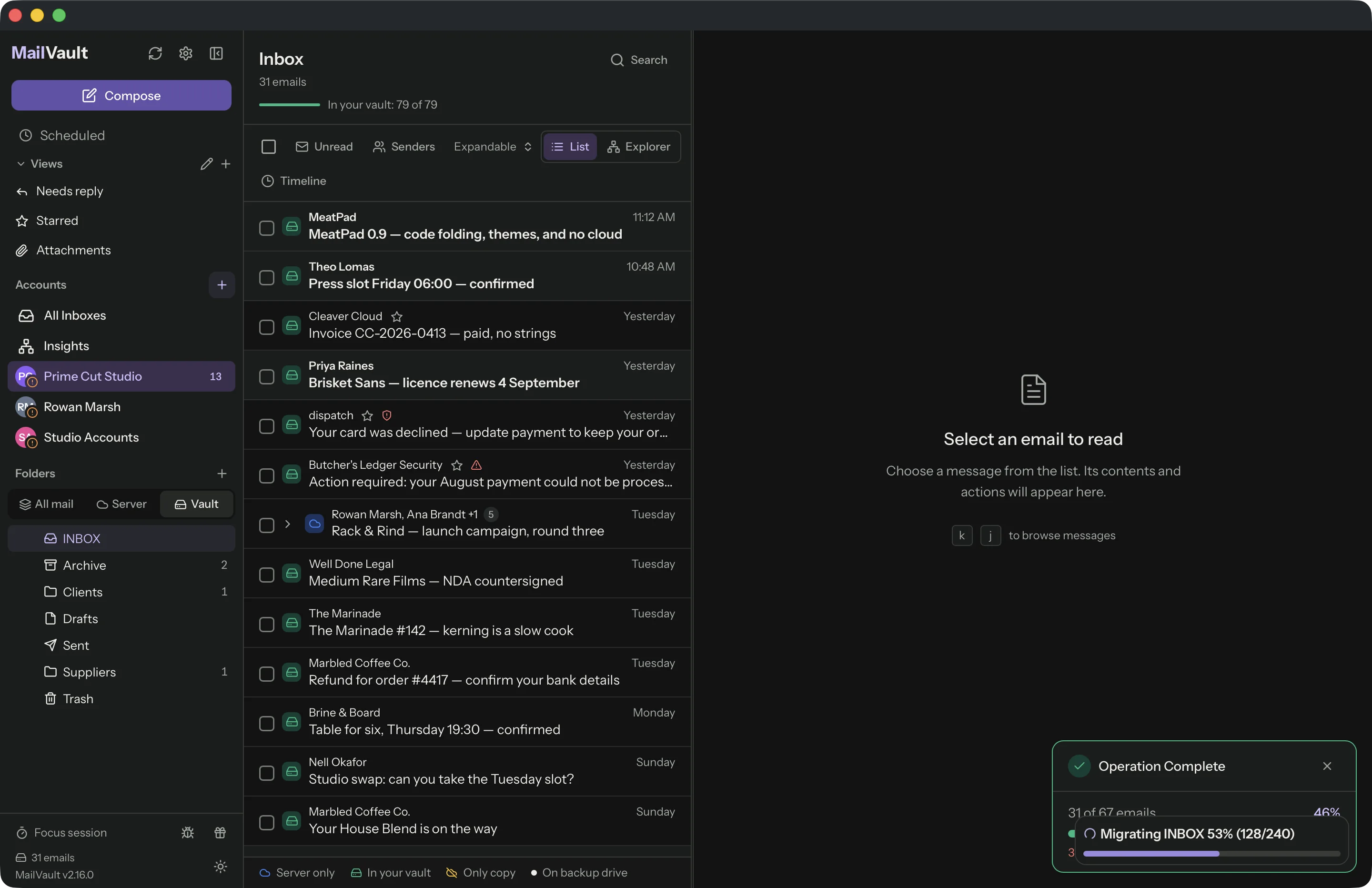
A vault is not a mail client that mirrors the server
Most mail apps are mirrors. They show what is on the server and keep a local cache for speed. When the server deletes a message, the mirror deletes it too on the next sync. That is right for keeping a phone, a laptop and webmail in agreement, and wrong for keeping mail.
A vault copy does not answer to the server: once a message is in the vault, nothing upstream removes it. MailVault does both jobs, a normal mail client with a vault behind it, and each row shows whether a message is on the server only, in your vault, or your only copy.
One detail matters. MailVault also keeps a working cache, and by default (the Keep Recent download mode) it removes cached copies older than a few months from your computer while the server keeps its copy. Cached mail is not the vault; archived and backed-up mail is never removed by any download mode. That is why the steps below end with an explicit backup or archive.
How to build your own email vault in 10 minutes
Ten minutes is the setup. Downloading a large mailbox keeps going in the background after that, and how long it takes depends on the size of the mailbox and your connection. The six steps below use only the free app.
- Install MailVault. Download the free app for macOS, Windows or Linux from the get started page. There is no MailVault account to create.
- Choose where the vault lives. The first run asks where your mail should be stored. The default is the app's own folder. You can pick another folder or an external drive instead, and change it later in Settings → Backup & Restore → Backup Settings. MailVault copies everything to the new place, checks every file arrived, and only then removes the originals. (Moving the vault is not available in the Mac App Store edition.)
- Add your account. Sign in to Gmail, Microsoft 365 or Outlook.com on the provider's own page, or enter IMAP details for any other provider. Your password or sign-in token is kept in your system's credential store, such as Keychain on macOS.
- Decide what goes into the vault. In Settings → Backup & Restore, "What to back up" starts at Archived emails only. To pull in mail that is still only on the server, choose All emails (download from server). This can use a lot of disk space, so check you have room. If you only want to keep some mail, skip this and archive by hand: select messages and choose Archive, which copies them into your vault and leaves them on the server too.
- Press "Back up all accounts now". Manual backups are free and unlimited. A progress bar runs, and the backup card tells you when every copy is in your vault. Later runs are incremental and only download new mail.
- Check it. Switch the folder list to the Vault tab. What you see there is on your disk. The header shows how much of the folder is in your vault. The account card in Settings also lists recent messages MailVault has shown or cached that are not in the vault yet, with a Save them now button; it covers the months your download mode keeps, not older mail still on the server.
Two optional steps make the vault sturdier. First, add a second copy on an external drive or NAS in Settings → Backup & Restore (in the Mac App Store edition, external backup folders are a separate purchase). MailVault writes the same .eml files there, the app never reads it day to day, and mail deleted on the server stays in it. Without it, everything lives in one folder on one computer, and losing that computer loses the vault. Second, once the vault holds your old mail, you can clear it from the server to free space. Deleting from the server on its own is free. Archive & Delete, which copies each message into the vault and checks it before removing the server copy, is a Premium feature.

Custody: what happens to your mail if the provider closes the account
Your inbox lives on infrastructure someone else runs, under terms they can change. Accounts get locked when a phone number or authenticator is lost. Employers close mailboxes the day someone leaves. Providers delete inactive accounts: Google, for example, says it can delete a Google Account that has been inactive for two years, along with its content (Google's inactive account policy). Our post on why your email provider is not a backup goes through these cases in more detail.
When the account goes, here is what a local vault does and does not give you:
- It keeps what was saved before. Every message already in the vault stays on your disk as a file. It does not need the old login, a password reset or the provider's permission to open.
- It does not keep receiving. Mail sent to the closed address after that point never arrives anywhere you can see. A vault preserves the past, not the address.
- It is only as safe as the disk. One copy on one laptop is still one copy. Keep the second copy on an external drive, and treat that drive like any other backup.
- It stays readable without MailVault. The files are standard
.eml, and you can also export the vault as a ZIP with a manifest that maps mail to accounts by address, so it can be re-imported on another computer.
If you know an account is about to close, build the vault first and check it on the Vault tab before you lose access. If you are on a Mac and still comparing tools, email archiving for Mac covers the wider choice.
Frequently asked questions
Is an email vault the same as a backup?
Close, but not quite. A backup is a copy you restore from when something breaks. A vault is a copy you also use: you read and search it every day, and it keeps messages after the server has deleted them. MailVault can also write a second copy to an external drive, which is the backup of your vault.
Is an email vault the same as encrypted or secure email?
No. Secure email services protect mail from being read by others while it sits on their servers. A local email vault is about who holds the copy. MailVault keeps your mail as plain .eml files so other apps can read them, which also means anyone who can open the folder can read them. Turn on your system's disk encryption (FileVault on a Mac, BitLocker on Windows) if the computer could be lost or stolen.
Can I open my vault without MailVault?
Yes. Every message is a standard .eml file in Maildir-style folders. Apple Mail, Thunderbird and other mail apps can open them, and a text editor can read them. You can also export the vault as a ZIP of .eml files.
What happens to my vault if I stop paying for Premium?
Nothing is deleted. Reading, searching, archiving and manual backups are free, and a lapsed Premium subscription never removes mail from your computer. You lose the Premium extras, such as scheduled backups and Archive & Delete.
What to do next
The quickest way to judge a local vault is to build one with a single account and look at the Vault tab. The local vault feature page has the details on file layout and moving the vault to another drive, and pricing lists what Premium adds. Once your mail is in the vault, MailVault Insights can show you who fills it.
Build your email vault
MailVault is free for macOS, Windows and Linux. No MailVault account, and your mail stays on your computer as plain .eml files.
Download MailVault free