
Gmail’s AI Search Is Expanding. Should Your Email Search Run in the Cloud or on Your Computer?
When you cannot remember the subject line, asking “Who sent the revised estimate?” feels easier than guessing keywords. Email search is moving toward that kind of conversation. But a useful answer and a durable record solve different problems.
On September 15, 2026, Google announced a wider rollout of AI Overviews in Gmail search. Eligible users can ask natural-language questions and receive summaries based on their mail. The expansion covers supported paid plans with Gmail set to English; Google lists exclusions for personal accounts in the EEA, UK, Switzerland, and Japan. Required smart-feature settings also apply.
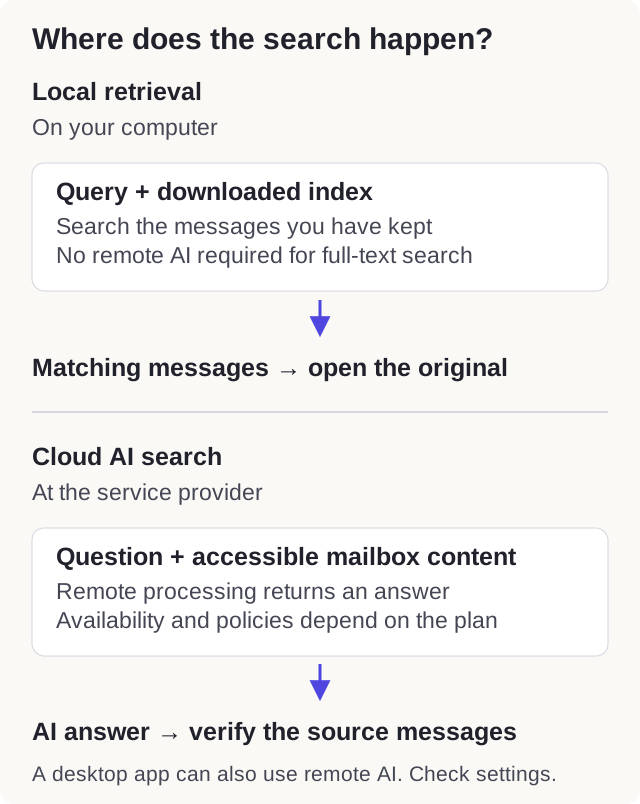
Decide whether you need an answer or a document
Suppose a contractor sends an estimate, then a revised estimate, then a correction in a reply. A summary can help you get oriented quickly. If you are about to approve a payment, you still need to open the original messages and establish which version is current.
For a receipt, signed attachment, or exact instruction, the goal is often retrieval: finding the document that contains the evidence. For a long discussion, the goal may be interpretation: understanding the conversation without reading every reply. Choose the tool around that distinction.
Local search has a different dependency
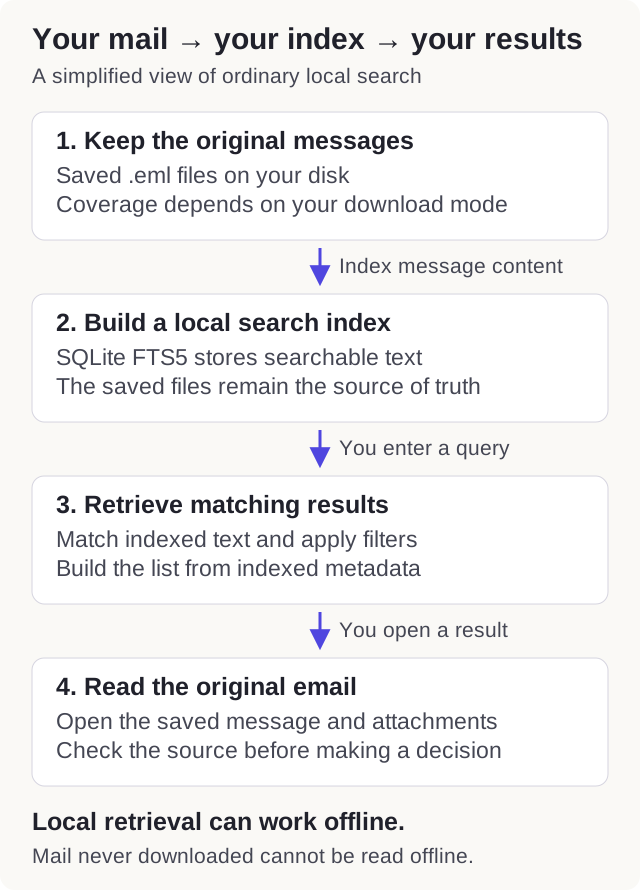
A local index searches content already stored on your computer. Once the relevant messages are downloaded and indexed, you can retrieve them without asking the provider’s search service. That is useful on a train, during an outage, or after the original account is no longer accessible.
The limitation is coverage. If your client only keeps the last three months, an offline search cannot find a ten-year-old invoice that was never downloaded. Some clients store headers or previews without the entire message. Check your download settings before treating an empty result as proof that the email never existed.
Cloud AI and local AI are separate choices
“AI search” describes an interaction, not where processing happens. A model might run on your computer, use a remote service, or combine local retrieval with remote interpretation. An app installed on your desktop can still send message content to a cloud provider.
Before enabling a feature, find out what leaves the device, which provider receives it, and which settings govern retention and training. Read the policy for your specific account type. Do not assume that every consumer service and workplace plan has the same terms.
A small comparison you can run yourself
Choose three tasks from your own mailbox: finding a receipt, identifying the latest version of an attachment, and understanding a long thread. Try each with the search tools available to you.
- Accuracy: did you reach the right original message?
- Coverage: were old folders and archived messages included?
- Traceability: could you check the source behind the answer?
- Offline access: could you repeat the retrieval without a connection?
Use non-sensitive examples if you are evaluating a new external service. Compare the actual task outcome rather than how polished the answer sounds.
MailVault’s approach
MailVault builds a local full-text index for the mail kept on your disk. You can filter by sender, date, attachments, and folder, then open the saved message. Its AI writing and thread-summary tools can use a model running on your computer or a provider you choose; these are separate from ordinary full-text search.
A practical workflow is to use summaries for orientation and original messages for decisions. Keep the underlying archive portable, check that the period you need is downloaded, and understand how the local index works. Faster answers are most useful when the source remains easy to inspect.
Written October 1, 2026. Provider features and availability may change; check the linked official guidance before changing your setup.
Keep a copy you can open tomorrow.
Archive messages on your own disk, search them offline, and keep them as portable email files.