
MailVault vs Paying for More Email Storage — Save Money, Keep Everything
Your inbox is full. Your email provider is asking you to upgrade. Gmail wants $2.99/month for Google One. Microsoft 365 starts at $6.99/month. Your business IMAP host charges per gigabyte. The obvious solution is to pay more. But is it the best solution?
Most of the storage in a full mailbox is consumed by old emails you rarely access — newsletters from years ago, attachments from completed projects, order confirmations from 2019. You are paying a recurring fee to store messages you almost never open. There is a better way.
The Real Cost of Email Storage
Storage upgrades seem cheap month to month, but they compound over years:
- Google One (100 GB): $2.99/month = $36/year, $180 over 5 years
- Microsoft 365 Personal: $6.99/month = $84/year, $420 over 5 years
- Microsoft 365 Business Basic: $6/user/month = $72/user/year — for a team of 10, that is $720/year
- Business IMAP hosting: Often $1–5/GB/month — a 50 GB mailbox can cost $50–250/month
And the storage only grows. You will never need less space next year. Each upgrade locks you into a higher recurring cost indefinitely.
The Alternative: Archive Locally, Free Up Server Space
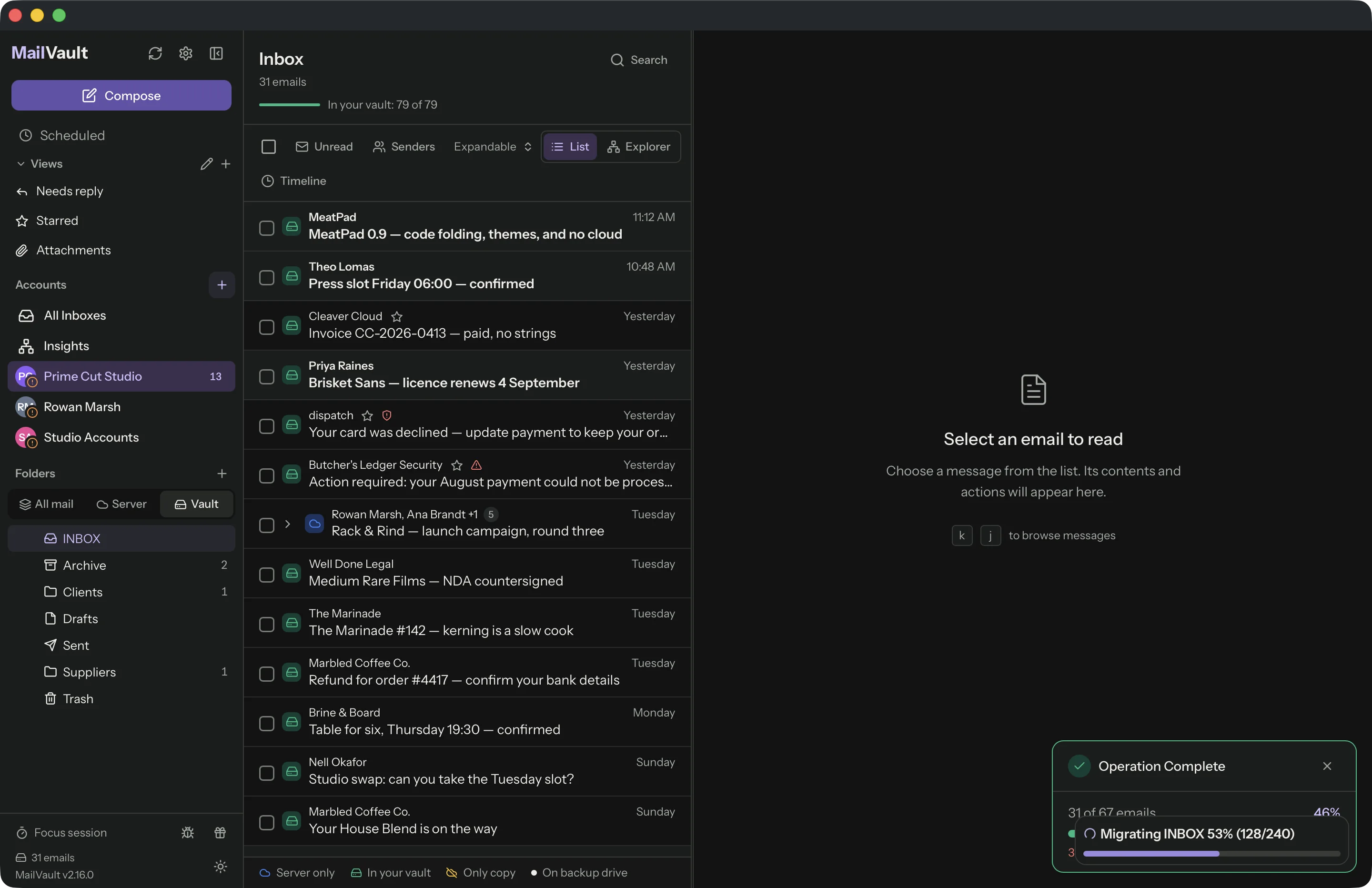
Instead of paying to store old emails on someone else's server, archive them to your own machine. MailVault connects to your email account via IMAP, downloads your emails as standard .eml files, and stores them locally in Maildir format. Once archived, you can delete the originals from the server to reclaim space — and downgrade to a cheaper plan.
You keep every email. You just stop paying to host the ones you are not actively using.
Side-by-Side Comparison
| Paying for More Storage | Archiving with MailVault | |
|---|---|---|
| Cost | Recurring monthly fee, forever | Free — one-time setup |
| Your data | On provider's servers (vendor lock-in) | On your machine, standard .eml files |
| Offline access | Requires internet | Always available, no connection needed |
| Storage growth | Keeps increasing, never shrinks | Offloads old mail, keeps server lean |
| Provider switch | Migration headache, possible data loss | Archive is independent of any provider |
| Privacy | Emails scanned for ads (Gmail) | Stored locally, never leaves your machine |
How It Works in Practice
A typical workflow looks like this:
- Connect your account in MailVault (Gmail, Outlook, Yahoo, or any IMAP provider).
- Let MailVault cache your emails in the background. It downloads headers first, then full email content including attachments.
- Select old emails you no longer need on the server — anything older than a year, completed projects, old newsletters.
- Archive them locally. MailVault saves each email as a standard .eml file on your disk.
- Delete the originals from the server to free up space.
- Downgrade your storage plan and stop overpaying.
Your archived emails remain fully searchable and readable in MailVault, even without an internet connection. If you ever need to find an old invoice or conversation, it is right there on your machine.
When Paying for Storage Makes Sense
To be fair, upgrading your storage plan is the right choice in some situations:
- You need server-side access from multiple devices. If you read email on your phone, tablet, and laptop and need everything synced everywhere, server storage is the simplest solution.
- You rely on server-side search. Gmail's search is excellent. If you search your email constantly and need instant results across your entire history, keeping everything on Google's servers has value.
- Your organization requires it. Some compliance frameworks require email to be stored on managed servers with specific retention policies.
When Archiving Locally Is Smarter
- You are paying for storage you rarely use. If 80% of your mailbox is emails older than a year, you are paying to store a digital attic.
- You want to reduce vendor dependence. Your emails in .eml format belong to you, not to Google or Microsoft.
- You are budget-conscious. Especially for small businesses or freelancers, recurring storage costs add up fast across multiple accounts.
- You want a backup regardless. Even if you keep emails on the server, having your own vault is good insurance against account lockouts, provider outages, or accidental deletions.
MailVault Does Not Replace Your Email Provider
MailVault is not an email hosting service. You still use Gmail, Outlook, or whatever provider you prefer for daily email. MailVault simply lets you offload old messages to your own storage, so you can use a smaller (and cheaper) plan for active email. Think of it as moving old files from an expensive cloud drive to your local hard drive — same files, no monthly fee.
Stop Renting Storage for Emails You Never Read
MailVault is free, open-source, and works with any IMAP email account. Download it, archive your old emails, and start saving.
See all features, read the FAQ, or compare MailVault with Apple Mail, Thunderbird, and read mail client vs mail vault.